Why a Voice Recorder Stops Charging
If your voice recorder not charging issue appeared suddenly, the cause is often simple: a bad cable, the wrong charger, a dirty port, or a worn-out battery. In other cases, the recorder may charge very slowly, show a charging light but never reach full power, or turn off again right after unplugging. This guide walks you through safe, beginner-friendly checks so you can identify the problem without damaging the device.
The key is to troubleshoot in a logical order. Start with the easiest external causes first, then move to the recorder itself. If the device still will not charge after these steps, the issue may require manufacturer support or professional repair.
Beginner-Friendly Diagnostic Checklist
- Confirm the recorder is turned off and left to charge for the recommended time.
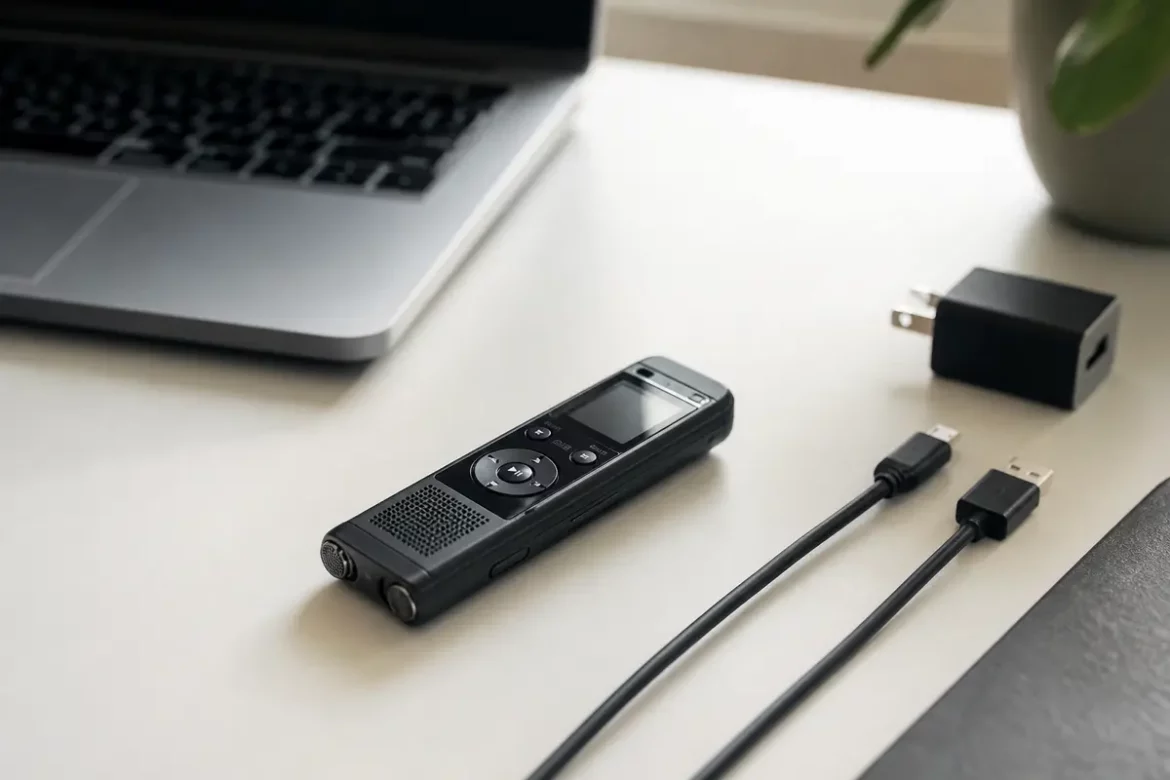
- Try a different USB cable that is known to work.
- Use a compatible wall adapter, not just a random phone charger.
- Inspect the USB port for dust, bent pins, or looseness.
- Check whether the charging indicator lights up.
- Test the recorder with another power source or computer USB port.
- Review the manual for model-specific charging instructions.
- Determine whether the recorder uses a built-in rechargeable battery or replaceable batteries.
If one step clearly fixes the problem, you may not need to go further. If not, continue through the sections below.
Faulty USB Cables
A damaged or low-quality USB cable is one of the most common reasons a voice recorder not charging problem happens. Cables can wear out internally even when the outside looks fine. They may also be designed only for data transfer or low-power charging, which can make charging unreliable or extremely slow.
Try a different cable that matches your recorder’s connector type, such as micro-USB or USB-C. If the recorder charges with another cable, the original cable is likely the problem. Avoid using frayed, bent, or very loose cables, since they can interrupt power flow and create heat buildup.
Incompatible Chargers and Power Sources
Not every charger works well with every recorder. Some digital voice recorders need a specific input voltage or a low-current power source. Using an incompatible adapter can lead to slow charging, no charging, or unstable behavior. This is especially important if you are using a fast charger meant for smartphones or tablets.
Check the recorder’s manual for the recommended charging specifications. When possible, use the original charger or a reputable replacement with the same rating. A computer USB port can be helpful for testing, but it may provide less power than a wall adapter, so charging may take longer. If the device charges from one source but not another, the issue may be the charger rather than the recorder.
Damaged Charging Ports
If the cable and charger are both good, inspect the charging port on the recorder. Dust, lint, corrosion, or a loose port can stop proper contact. In some cases, the port may be physically damaged from repeated plugging and unplugging. If the connector wiggles excessively, the internal port may be worn or partially detached.
Use a bright light to look inside the port. Do not insert metal tools, needles, or other sharp objects, since that can short the device or damage the contacts. If you see debris, only use gentle, manufacturer-safe cleaning methods. If the port looks bent, broken, or loose, professional repair may be necessary.
Battery Aging and Reduced Capacity
Rechargeable batteries lose capacity over time. A recorder that used to last for hours may eventually charge slowly, drain quickly, or fail to power on after sitting unused for a while. This is a normal sign of battery aging, especially in older devices or units that have been stored for long periods.
If your recorder turns on only while connected to power, or it shuts down soon after unplugging, the battery may be near the end of its life. Some models have replaceable batteries, while others use built-in rechargeable cells that should not be opened by the user. In the latter case, battery replacement should be handled by the manufacturer or an authorized service center.
Charging Indicators and What They Mean
Many recorders use LED lights, icons, or screen messages to show charging status. These indicators can help you understand whether power is reaching the device. However, indicator behavior varies by brand and model. A blinking light may mean charging is in progress, while a solid light may mean full charge or an error state.
If there is no light at all, test the cable and charger first. If the indicator appears but the battery never increases, the issue may involve the port, battery, or internal charging circuit. Always check the manual for exact indicator meanings, because some devices use different colors or symbols for low battery, charging, full charge, and charging errors.
Device-Specific Charging Instructions Matter
Each recorder brand may have its own charging method. Some models charge only when powered off. Others require a specific cable, a computer connection, or a wall adapter with exact output ratings. A device may also need to be unlocked or set to a certain mode before charging works properly.
Before assuming the recorder is faulty, review the manual or the manufacturer’s support page. If you need help choosing a model with stronger battery performance for future reference, you can compare options here: long battery life voice recorder guide. For current charging problems, though, the manual is the best source for model-specific instructions.
Rechargeable vs Replaceable-Battery Recorders
It is important to know what type of power system your recorder uses. Some digital voice recorders have built-in rechargeable batteries. Others use standard replaceable batteries, such as AAA cells, and may not charge at all through a USB cable.
If your recorder uses replaceable batteries, a USB port may be for data transfer only. In that case, the device will not charge from USB because it was never designed to. If the batteries are disposable, replace them with fresh ones of the correct type and polarity. If the recorder uses a rechargeable battery, make sure the battery is not simply depleted and that the charging method is correct.
USB Charging vs USB Data Transfer
Many people assume a USB cable always charges a recorder, but that is not always true. Some USB ports only transfer files to a computer and do not supply enough power to charge the battery. Others may do both, but only when connected with the proper cable or driver setup.
Data transfer allows the recorder to move audio files between the device and a computer. Charging sends electrical power to the battery. A cable may support one function, both functions, or neither in a reliable way if it is low quality or damaged. If your recorder connects to the computer but does not charge, the USB connection may be working for data only, not power.
Safe Charging Practices to Protect the Recorder
- Use the charger and cable recommended by the manufacturer whenever possible.
- Do not charge the recorder in extreme heat or direct sunlight.
- Avoid charging from damaged outlets, unstable power strips, or unknown USB hubs.
- Let the recorder rest if it becomes unusually hot while charging.
- Keep the USB port clean and dry.
- Do not force the connector if it does not fit easily.
- Never open or puncture the battery compartment unless the manual clearly allows it.
Safe charging helps prevent further damage and can extend the life of the device. If the recorder becomes warm during charging, some warmth may be normal, but overheating is not. Disconnect it immediately if you notice swelling, odor, smoke, or unusual heat.
When the Recorder Still Will Not Power On
If the recorder appears to charge but still will not power on, the battery may be too deeply discharged, the charger may be underpowered, or the internal electronics may be failing. Try leaving it connected to a known-good charger for the full recommended charge time before testing again.
If there is still no response, try a different cable, adapter, and power source. For replaceable-battery models, install new batteries and confirm they are inserted correctly. If the recorder remains unresponsive after all basic checks, the issue may be internal and outside the scope of simple troubleshooting.
When to Contact Manufacturer Support or Seek Repair
Contact the manufacturer if the recorder is under warranty, the charging port is loose or damaged, the battery appears to have failed, or the device shows error messages you cannot clear. Manufacturer support can often confirm whether the issue is a known defect, firmware problem, or battery replacement case.
Seek professional repair if the device has visible port damage, liquid exposure, persistent overheating, or internal battery problems that should not be handled at home. Do not attempt unsafe disassembly or battery removal unless the manufacturer explicitly provides instructions for your exact model.
Frequently Asked Questions
Why does my voice recorder say it is charging but the battery still drops?
This usually points to a weak battery, poor cable connection, incompatible charger, or a faulty charging circuit. If the battery drains quickly after charging, aging battery cells are a likely cause.
Can I use any USB charger for a voice recorder?
Not always. Some recorders need a specific voltage or low-current charger. Using the wrong adapter can cause slow charging or no charging at all.
Why does my recorder charge on my computer but not on the wall adapter?
The wall adapter may not match the recorder’s power needs, or it may be faulty. A computer port may supply different power levels, which can explain the difference.
How do I know if the battery is the problem?
If the recorder only works while plugged in, turns off soon after unplugging, or charges very slowly despite trying a known-good cable and charger, the battery may be worn out.
Should I open the recorder to check the battery?
No, not unless the manual specifically says it is user-serviceable. Opening the device can damage it and may be unsafe, especially with built-in batteries.
Final Thoughts
A voice recorder not charging issue is often caused by something simple: a bad cable, the wrong charger, a dirty port, or an aging battery. By checking each part step by step, you can usually identify the problem safely without guesswork. If the recorder still fails to charge or power on after these checks, contact the manufacturer or a qualified repair service for next steps.
Why is my voice recorder not charging?
The most common reasons are a faulty USB cable, incompatible charger, dirty or damaged charging port, or an aging battery.
Can a USB cable charge and transfer data at the same time?
Sometimes. Some cables and ports support both, but others only transfer data or only provide limited charging power.
What should I try first if my recorder charges slowly?
Use a different cable, switch to a compatible wall adapter, and check the charging port for debris or looseness.
Do all voice recorders charge through USB?
No. Some use replaceable batteries and may use USB only for file transfer, not charging.
When should I get professional help?
If the port is damaged, the battery appears to have failed, the device overheats, or basic troubleshooting does not work, contact support or a repair service.